Showing posts with label etsy. Show all posts

Wednesday, April 11, 2012

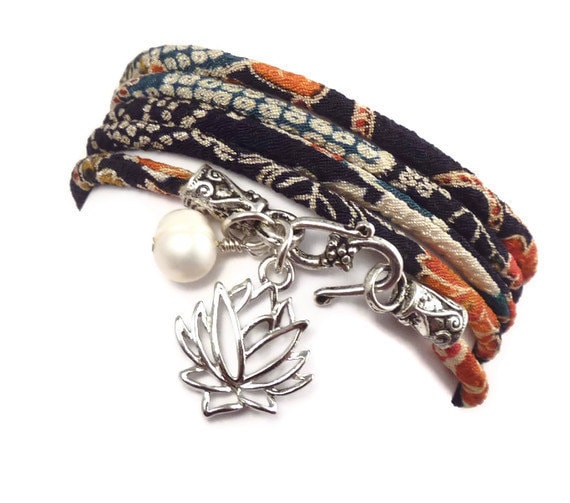
Featured Wrap Bracelet Charm - Lotus

Of all the ancient Eastern symbols,the lotus charm seems to evoke the most mystery, power, beauty, and inspiration in those who work with it. Most of us are naturally drawn to beautiful things in nature like flowers, but the lotus seems to be in a category all its own. From Egypt to India, China to Arabia, the lotus has blossomed as a spiritual charm and symbol that has comforted, uplifted, and guided people for countless thousands of years.


Like most of the charms and symbols I use, there is a mysterious and interesting aspect to this sacred flower - its meanings and secret interpretations are stunningly similar in all of the various places where it is used. Across time, distance, and cultural differences, the pure elegance and beauty of the lotus has delivered the same timeless message to us all - that we can rise above!
Due to the delicacy and profound beauty of the lotus, you may be surprised to learn that it actually tends to grow in swamps, marshes, and even in dirty and muddy waters. The lotus rises up above the muck and blossoms in its full color only when it has conquered the surface of the water. For this reason, it has always been held as a symbol for rising up above one's problems and reaching one's true potential by becoming more than the people, ideas, and things that may try to knock us down.

The lotus sprouts in the dark and muddy base of the pond only to strive for the warm light, cool breeze, and authentic being that it attains when it passes the surface of the water. The lotus reminds us at every step of our journey that we have the power to reach further, grow stronger, aim higher, and blossom to be the unique and powerful person we truly are - no matter what circumstances may be happening in us or around us!

If you would like to bring the power of the ancient lotus in to your life - or if you know someone who could use a little 'miracle grow' for the soul, there is no better way to harness it than through one of my handmade lotus charm wrap bracelets. I combine the healing power of color, gemstones, and sacred symbols to help surround you and your loved ones in a moving meditation of greatness so that you can grow, blossom, and shine!

To view my full selection of one of a kind lotus charm wrap bracelets, click here!


Thursday, December 15, 2011

The Meaning of the Hamsa


What does the Hamsa symbolize? I have always known that it is a symbol of protection, but in writing this post I discovered many other interesting facets of the Hamsa.

It is a symbol dating back to prehistoric times and is an universal sign of protection. The hamsa protects by deflecting the destructive power of the evil eye. The evil eye represents the negative energies that can arise from jealousy, hatred, and envy.

It is often made of something shiny or reflective in order to reflect off the evil.


While used in numerous cultures, the word Hamsa, meaning five, has additional symbolic meaning in the Jewish and Islamic traditions.

In Judaism, it represents the five books of the Torah for Jews. It also symbolizes the fifth letter of the Hebrew alphabet, "Heh", which represents one of God’s holy names. It is often thus called the Hand of God.

Many Jews believe that the five fingers of the hamsa hand remind its wearer to use their five senses to praise God.


The Hamsa hand is also a popular talisman with Muslims, who call it the Hand of Fatima, referring to the daughter of Mohammed. Fatima is described as a faithful, holy, woman.

Also, to the Muslims, the Hamsa sometimes refers to the five pillars of Islam, the foundation of Muslim life:
  • Faith or belief in Muhammad;
  • Establishment of the daily prayers;
  • Concern for and helping the needy;
  • Self-purification through fasting; and
  • The pilgrimage to Mecca
 The Hamsa means many things to many cultures, which is why it is one of my favorite symbols to use.  See more of my designs which include the Hamsa HERE.


Wednesday, September 21, 2011

My Etsy Story (or how I became a jewelry designer)

The charmed design 1012 line came into being as something constructive and positive to do while I recovered from a sudden and life threatening illness.

Two years ago, I woke to find myself in an intensive care unit with absolutely no knowledge of how I got there. I learned that I had become ill from an infection that was a side effect of a routine tooth extraction. I came very close to dying, had several life saving surgeries, and am blessed to be here today.


Though the illness caused me to lose my job, home, and life as I knew it, surviving such a near death experience has made me feel and believe that I am indeed - CHARMED. Hence my name, Charmed Design 1012.

one of my first bracelets
After a month or two of creating, I had a pile of pretty bracelets and, after encouragement from my very supportive family, decided to open up shop on Etsy.com. My shop has been open a year now and is enjoying growing success. I also sell my jewelry in boutiques and galleries throughout the US.


Out of tragedy has come something beautiful. I have a career that I love and I am getting healthier by the day.  My jewelry reflects my experience and love for life. I share this by exploring the fascinating world of symbols that have traditionally surrounded and directed us.  Each piece is designed to be full of meaning and beautifully unique. My jewelry is all about feeling good and looking gorgeous.


Visit my Etsy shop HERE.


Monday, November 15, 2010

Google Analytics - What Are Your Peak Hours?

Do you know your peak hours? I didn't and I may be the only person NOT to know this, but I just learned how to find out what my peak hours are. Just in case I am not alone, I am sharing this golden nugget of information.

Access Google Analytics. On your Dashboard, on the top left,  go to Visitors ->Visitor Trending->Visits. Now look at the top right above the graph and below the dates. See a clock icon? Click and there you go - how many visits you have at every hour for whatever dates you have set. This is good stuff!

For the last month, 1:00PM has by far the most visits in my shop. My visits are fairly stable between 6:00AM-8:00PM besides that spike What is your best hour?

I would love to hear what your peak hours are, will you come back and report?

Monday, November 8, 2010

Cool Tool: Favoritizer

As the holidays draw nearer and I begin my holiday shopping, I quickly become overwhelmed at the wonderful choices we have on Etsy for gifts for family and friends alike. I've been hearting with abandon, swelling my favorites list. Sound familiar? Don't fret, read on.

In the Etsy forums recently, I came across a post about a new Etsy tool - The Favoritizer. It was developed using the Etsy API by an Etsy buyer who also happens to be married to an Etsy seller. The  Favoritizer helps you organize your favorites. I tried it out and in minutes, my favorites were neatly arranged into different folders that I created.

All you have to do is import your favorites by clicking"Get My Favorites.' Within seconds, the screen is full of all of your favorites. Next, you create lists and drag and drop the photos into the folders you just created. It is that simple.

If you'd like more information that just the item photo, simply click the photo and up pops a balloon with the full item title, the seller name, a portion of the description, and the price.  Click the item title and you go directly to the listing.

If you have an item that has sold in your favorites and would like to remove it, simply click on it, you will see a red minus sign, click on it and the listing is gone.

What do you think? Will you use The Favoritizer? Try it and let me know what you think.

http://favoritizer.checklet.com/

Wednesday, November 3, 2010

Where Are You?

Do you know etsyhacks.com? If you don't you should. They have some great tools to help you with your listings and more made to work on Firefox, and a few for Explorer. But of all the features of etsyhacks, my favorite by far is "where am I." 

"Where Am I" allows you to input your seller name and a search term and discover what page your listings show up on for that search term. For instance, when I input "silk ribbon bracelets" - And, by the way, If you haven't seen mine, you should check them out here, they are really pretty.- Sorry, I digress. If I input "silk ribbon bracelets" and my seller name, I find out I show up on page one! But, if I search "charm bracelets", I unfortunately find that I appear on page eight. You get the picture. It can be very useful when crafting item titles and tags

Try it, find out where you are today:
http://www.etsyhacks.com/where_am_i/

Wednesday, October 20, 2010

How Did Your Customer Find You?

In the vast sea of items on Etsy, I am always curious as to how my customers found me, little old me, among the masses. How about you? It is such useful information, seeing if certain marketing or advertising efforts are succeeding and helping you fine tune your efforts.

 I want to preface what I am about to tell you with the statement that I am sure Google Analytics can somehow answer this question for you. But, if you are anything, like me, GA can be very overwhelming and even a bit confusing.

I have thought about asking this question in the convo I always send after a purchase, acknowledging that I have received their order and thanking them for their purchase, but it seems a little invasive to me. Now I've  found a way that takes me out of the equation and allows them a choice as to whether to answer.

.....Paypal. Paypal checkout to be more specific. Paypal allows you to set up a survey question with up to five possible answers during the checkout process. Whether your customer answers is up to them, but you never know if you don't ask.

How To:
1. Login. Go to Profile, then down to More Options and click.

2.Under Selling Preferences, choose Custom Payment Pages. You then have two tabs:  Page Style and Options, choose Options.

3.Scroll down to Merchant Service Options and check Add A Customer Survey. You can now enter a question. I asked 'How did you find Charmed Design 1012?' And then  add up to five answers. I wanted more than five, but that is all they allow. My choices are: browsing etsy, facebook, search engine, word of mouth, and other site. Click Save.

4. To find out if your survey question was answered, click Transaction Details, and the answer will be there if your customer elected to answer.

Will you use the survey question? If yes, what will you ask? Please comment and let me know!

Thursday, October 14, 2010

How To Sell Gift Certificates On Facebook, Blogs and Websites

I came across a wonderful post yesterday, on the TrendyGal blog detailing how to sell gift certificates for your Etsy shop from your Facebook page.

Trying to sell gift certificates directly from your Etsy shop is both problematic and costly. First, you have to create a listing for the gift certificate and create a code for the buyer to use in a convo when he or she uses it. When someone buys the gift certificate, you pay your usual Etsy fees for a sale. And then you pay again when the certificate is used and you are charged Etsy fees for the item. And if the desired item is more than the gift certificate? You must send a revised invoice and wait for them to pay. Whew! Way too much trouble for me.

Last night I discovered a great alternative. I learned how to sell gift certificates on Facebook.  You add a tab to your page with a 'buy gift certificate' button (instructions to follow) and Paypal takes it from there... processing payment, managing balances, designing the certificate and printing it or emailing it to the recipient.

Here is a link to my page so you can see what it looks like:
http://www.facebook.com/charmeddesign1012?v=app_4949752878

Now for the how-to:
1. Login in to Paypal and click on the Merchant Services tab.( Note: this feature is only available for business accounts, not personal. I upgraded so I could use it.) Under 'Create Buttons,' you will see 'gift certificate.'

2. Click on 'gift certificate' and follow the next steps to create your button.

3.Note that you can customize the look of the gift certificate where it says 'gift certificate style,' you can add a logo image by providing an image url. I used my etsy banner. To do this, go to your etsy shop and right click on your banner and click 'copy image url' and paste into the paypal box. You can then preview what your gift certificate will look like.

4. Click 'create button' and copy the code.

5. Go to your Facebook fan page and click 'edit page.' Scroll to the bottom of the page where you will see 'More Applications' and click 'browse more.'  Search applications for Static FBML, click, then 'add to my page' on the left.

6. Next, click 'edit page' on your page. Locate the static FBML application from your list and click 'edit.' Here you will change the name of the tab to Gift Certificates and paste the code from Paypal. After pasting the code, you can add any text you'd like. Save and publish.

7. All that is left now is to make sure your new tab is showing. If not, go to the + sign on the right of the tabs and choose the gift certificate tab.

Done and Done! Now you are selling gift certificates!

The only fault I have found is that I get an error when trying to buy a gift certificate in Chrome. But, it works perfectly with Explorer and Firefox. Don't know about Safari, maybe someone could come back and report.

Here is Paypal's very detailed guide to the gift certificate function, including a description of the checkout experience when both purchasing and redeeming a gift certificate. https://cms.paypal.com/cms_content/US/en_US/files/developer/MerchGCs.pdf

To add the button to a blog or website, just copy and paste the html as you did in Facebook. As you can see, I added the button to a page on my blog.

I would love to know what you think about this feature and whether you will use it and if you will , how. Please comment!


Thursday, October 7, 2010

I'm in Love! With Wix.com - Free Website Builder


A couple of months ago I decided I  needed my own website, even if all I used it for was a portal to my etsy shop. I wanted a site I could direct customers to that was all my own - my design, my information, my layout.

So, I started to look at all the website builders out there, free and paid. I looked and looked and looked and looked. Nothing offered me the kind of sophistication and functionality I wanted to design the website of my dreams without knowing any programming.

And then I found wix.com and my prayers were answered.  Wix is a free website builder that has literally thousands of flash - yes, flash!-  templates that you can make your own without knowing any programming and without any downloads to your computer.  And their templates are very  creative and high quality with  a huge array of options.

Customization is super easy. Wix uses a drag and drop interface. Move anything anywhere. You can add text, pictures, sound.  You can change colors, font, shapes.  You can add a ton of flash animations and effects.

And they have a bunch of cool widgets you can add to your site:  a player widget that allows you to add music, videos, video playlists. Set up links to your Twitter account and blog.  Insert a Contact Form that allows visitors to leave messages that get delivered directly to your email.  If you have a brick and mortar, insert a Google Map to direct customers to your exact location. And you can add as many html widgets (like,perhaps, an etsy mini) as you want.

OK, so you can build a website, design and customize it in any way imaginable and publish it to the web….for free! What more can you ask for? Oh yes, their customer service is great.  Believe me when I say this is the best website builder out there, free  or not.  I did an enormous amount of research before I decided on wix.

They also have several premium plans, from around $5 to $20/month.  I use a $ 9.95/mo plan that allows me to use my own domain name and removes the wix ads that come with a free site.

To get an idea, take a look at my website. I built it in a day and you can too.  You can have an uber professional looking site today, for free.  Have fun!


Template by suckmylolly.com